
Creating an approval link
If you write for others — as an agency, as a freelancer or for your boss — you show them a post before it appears. That is what the “Approval link” area (05) is for. It opens once the post has been saved.
“Create approval link” gives you an address under kenjtec.com/review/… that you put into your email or message with “Copy link”. “Take a look” opens the page the way your client sees it, without it counting as opened. The link is valid for 30 days, and each post has one link: a new one deactivates the old one.
Tailor first: with versions, your client sees each one in its own network; without them, only your source text. As long as there are no versions, the card reminds you.
Approval links come with every subscription. Without a subscription, the button is replaced by a note saying from which subscription they are available, and the link “See subscriptions”. The subscriptions are on the pricing page.
- Open the post and choose the “Approval link” area.
- Click “Create approval link”.
- Click “Copy link” and send the link to your client.
Anyone who has the link can see the post. Only give it to the people who should see it — and deactivate it if it ends up in the wrong place.
What your client sees
Your client opens the link without an account and without signing in. At the top are the post’s title, the brand it was written for, the date if there is one, and how long the link is valid. Below that is the post on a phone — the same mock-up as in your preview, with the brand’s name, logo and handles. They flip through the networks that have a version and the reel, and switch between light and dark.
Below the phone they can write a note on exactly this network, under “Your feedback” a note on the whole post and — if they like — their name. Then they click “Looks good” or “Request changes”; for changes, the page asks for a word on what should be different. Afterwards it says “Thank you — your feedback has arrived.” As long as the link is valid, they can change their answer; the last one counts.
The page speaks your client’s language, not yours: it follows the language they chose, their country or their browser. The texts of your post stay as you wrote them. Nothing is posted from the page, and it shows only this one post — no other posts, no email address, nothing from your account. Search engines don’t list it.
If your account has several brands, choose the right one on the post under “Which brand?” before you send the link — otherwise your client sees no brand name.
Reading the answer
In the “Approval link” area you see how long the link is valid and whether it has been opened: “Opened on …” or “Not opened yet”. It counts the first opening through the link you sent. Your own look through “Take a look” doesn’t count — that page says “Your preview” at the top, and only your client can answer.
When your client answers, it says “✓ Approved on …” or “Changes requested on …”, with their name if they gave one, and below it their comment and their notes per network. At the same time you get an email at your account’s address, in its language and with a link back to the post. If they send several times in a row, you get at most one email every five minutes — unless they change their decision.
If you change the post after they answered — title, text, images or their order, a version, the reel or the brand —, the answer is followed by “Changed since — the answer refers to the earlier version. …” The link already shows the new version then; ask your client to take another look. Date and campaign don’t count, because they don’t change what the post says.
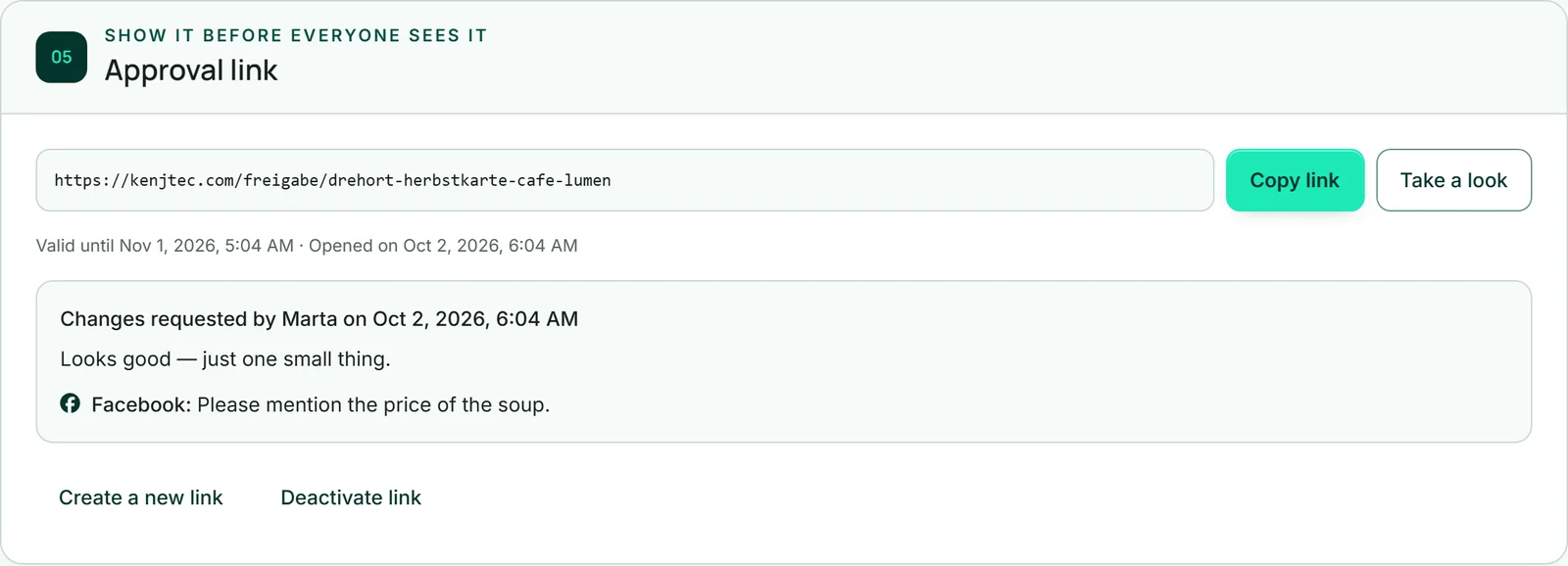
Creating a new link or deactivating the link
“Create a new link” gives you a new address and deactivates the old one at once — for example if the link went to the wrong place. The new link starts without an answer.
“Deactivate link” blocks the link after a confirmation, without issuing a new one. Anyone who opens it afterwards reads “This link is no longer valid — ask for a new one.” After 30 days, every link expires on its own.
The last answer stays as a line, such as “The last answer was: Looks good (…).” With “Create approval link” you get a new link at any time. If you delete the post, its links go with it.
- Open the “Approval link” area.
- Click “Deactivate link”.
- Confirm the question “Deactivate the approval link now? Anyone who has it won’t see the post any more.”