
Forms from a sentence or photo
KENJTEC FormBuilder ai is an online form builder for contact forms, surveys and sign-ups – for clubs, cafés, self-employed people and small businesses worldwide. Describe your form in one sentence or photograph the paper version, and Kenji, KENJTEC’s AI, turns it into a draft for you to check. People fill it in without an account, via link or QR code.
Idea and hands-on demonstration
One link, controls in your visitors’ language — the responses come to you.
- Scan the QR code and fill in without an account
- Buttons in your visitors’ language
- Responses by email, chart and spreadsheet
Scan the QR code and fill in without an account
Read the film’s explanation
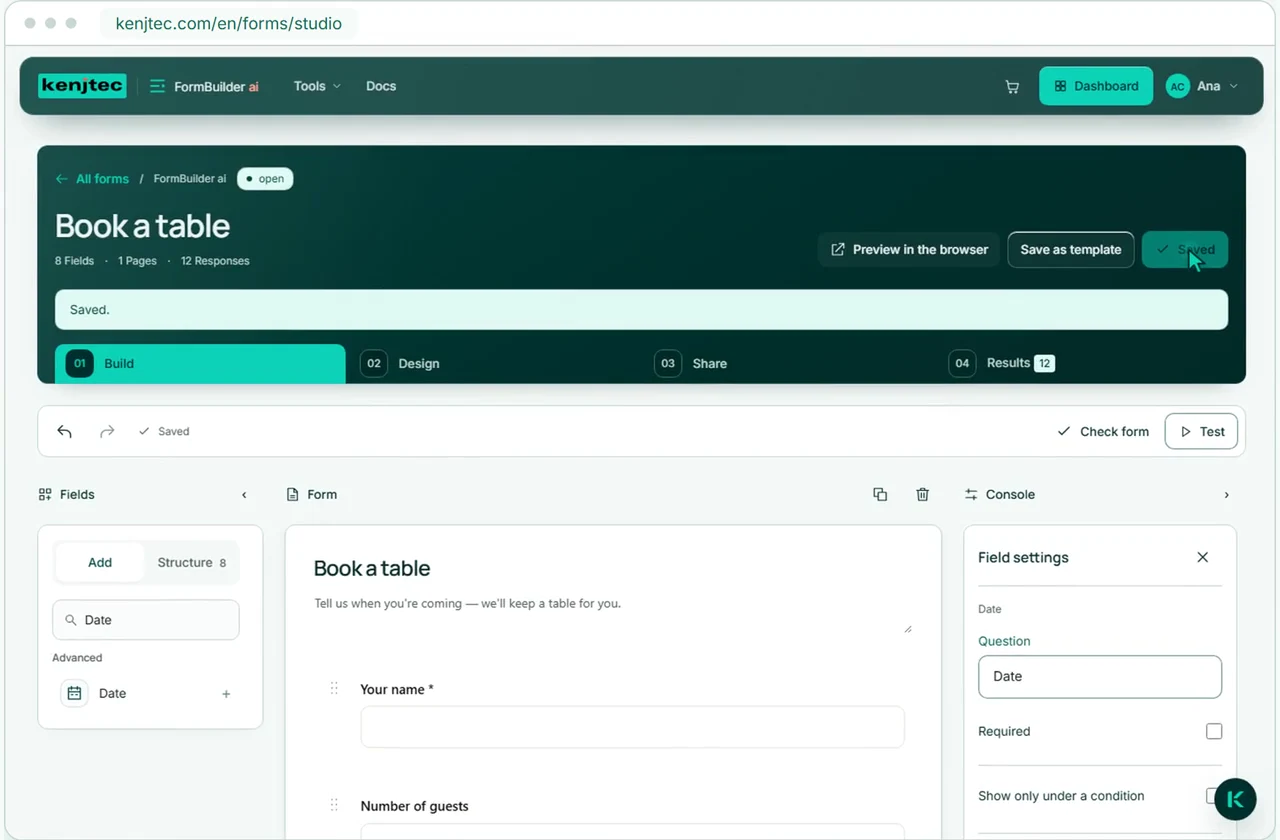
Kenji builds your form from a description or a photo. It uses your branding and can be embedded in your website. Responses arrive by email and are ready to analyse in FormBuilder.
- No coding needed
- Responses as charts and as a downloadable spreadsheet
- Each form has its own link. Share it with anyone; only you need an account.
- Carries your brand’s colours, font and logo
Two ways to your first draft
Create a form with AI.
Describe it or take a photo
A paper form, a sign-up sheet or a menu — Kenji rebuilds it digitally.
Kenjikenjtec ai
A form from one sentence
Sign-up for the anniversary party with meal preference and number of guests.
Photograph a form
Review the result before sharing it.
More than fields and submit
Conditional logic and price calculator.
Control questions. Calculate prices
Conditional logic
Show questions only when they fit the previous answer.
- Shorter forms for your visitors
- Relevant follow-up questions instead of unnecessary fields
- Multi-page flows with clear steps
Price calculator
Selected options and quantities produce a clear estimate immediately. You set the currency and number format on the form – for example, taka for a painting business in Dhaka.
An estimate instead of a surprise
Calculation using visible fields only
Kenji
Edit forms with AI.
Tell Kenji what you want to change
Adjust questions and fields through chat. Review the draft, then save it. For a paper version, open the form in PrintStudio afterwards.
- You see and change every draft.
- Kenji saves nothing — only your click puts the draft into effect.
- Kenji can summarise your responses.
Kenjikenjtec ai
Change as draft
Make the phone field optional and show the meal preference only for attendees.
You're shown the change — it's only saved when you press “Save”.
From consent to the kitchen
Forms with signatures and table ordering.
Forms can do more than collect responses: let people sign and place orders, then manage those orders in a dedicated kitchen view.
Signature
Draw with a finger or type the name.
Kitchen view
See new orders and tick off completed ones.
Share without detours
Share and embed forms.
One link, one QR code, your address
Share your form by link, embed it in your website or open it in PrintStudio. There it becomes a paper form to fill in or a menu – as a PDF with your branding.
- Share directly
- QR code to your form
- All your forms live under your account’s address — shareable without a domain of your own.
- Embed it in any website — including your KENJTEC or WordPress site
Ready-made templates
Form templates – ready-made and your own.
Not every form starts from scratch
Contact, survey, registration, application, feedback — adapt instead of starting from scratch. You save your own forms as templates, and building by hand uses no AI credit at all.
CV
With attachments to upload
Employee form
Across several pages, step by step
Menu
For reading and as a QR code
Order at the table
With kitchen view
Forms for your use case.
- Course, workshop and eventSign-ups with limited places, shared by link or QR code.
- Club and communityMembers-only pages and sign-ups under one address.
- Café and restaurantA website from one sentence, and the menu by QR code at the table.
- Trades and repairsA website, enquiries with a guide price, and sign-off with a signature.
Frequently asked questions.
Do the people filling in my form need an account?
No. Anyone filling in your form only needs the link or the QR code, on any device. Only you need a KENJTEC account – to build the forms.
Can I take payments with a form?
No. Forms don’t take money. The price calculator and table ordering show a guide price or a total – payment happens elsewhere.
What kind of signature is it?
A simple electronic signature: drawn with a finger or mouse, or typed as a name. It doesn’t prove who signed and is not a qualified electronic signature.
Is my form translated?
Only the interface: buttons, hints and error messages on the form page appear in your visitors’ language – in twelve languages, with Arabic right to left. Your questions appear exactly as you wrote them.
Does it work without AI?
Yes. You build from a ready-made template or your own, or field by field, without using AI credit. The AI for sentences, photos, edits and summaries comes with the plans.
When does my form go online?
As soon as your plan is active and BrandStudio lists the company or operator, an address and an email or phone number. Until then it stays closed. Whoever should fill it in gets the link or QR code from you.
Where do the responses go?
They come to you. After every submission you get an email, which you can switch off. In FormBuilder you see all responses as charts and download them as an .xlsx spreadsheet.
Your business. Your platform.
Your tools. One KENJTEC plan.
Website, brand, content and office belong to one platform. Choose the plan with room for your projects.
One account connects your tools. AI uses your shared AI credit.
Create your first form.
Ask your customers, not your gut feeling
Pick a template, write a sentence or photograph your paper form — then you review and edit your first form in the Studio.
Build formA card is required for your account. AI and publishing require a plan.