
Your brand, in one place
KENJTEC BrandStudio ai is the brand hub for self-employed people, agencies and small businesses worldwide. You set your logo, colours, fonts and company details once; forms, invoices, WordPress sites and print materials use them, and your website’s legal notice is built from your details. No logo yet? Kenji, KENJTEC’s AI, drafts logo suggestions in your brand colours.
Idea and hands-on demonstration
Set up your brand once — use it for your website, forms, invoices, shop and flyers.
- Set colours and fonts in one place
- Manage your logo in one place
- Use your brand in forms and WordPress
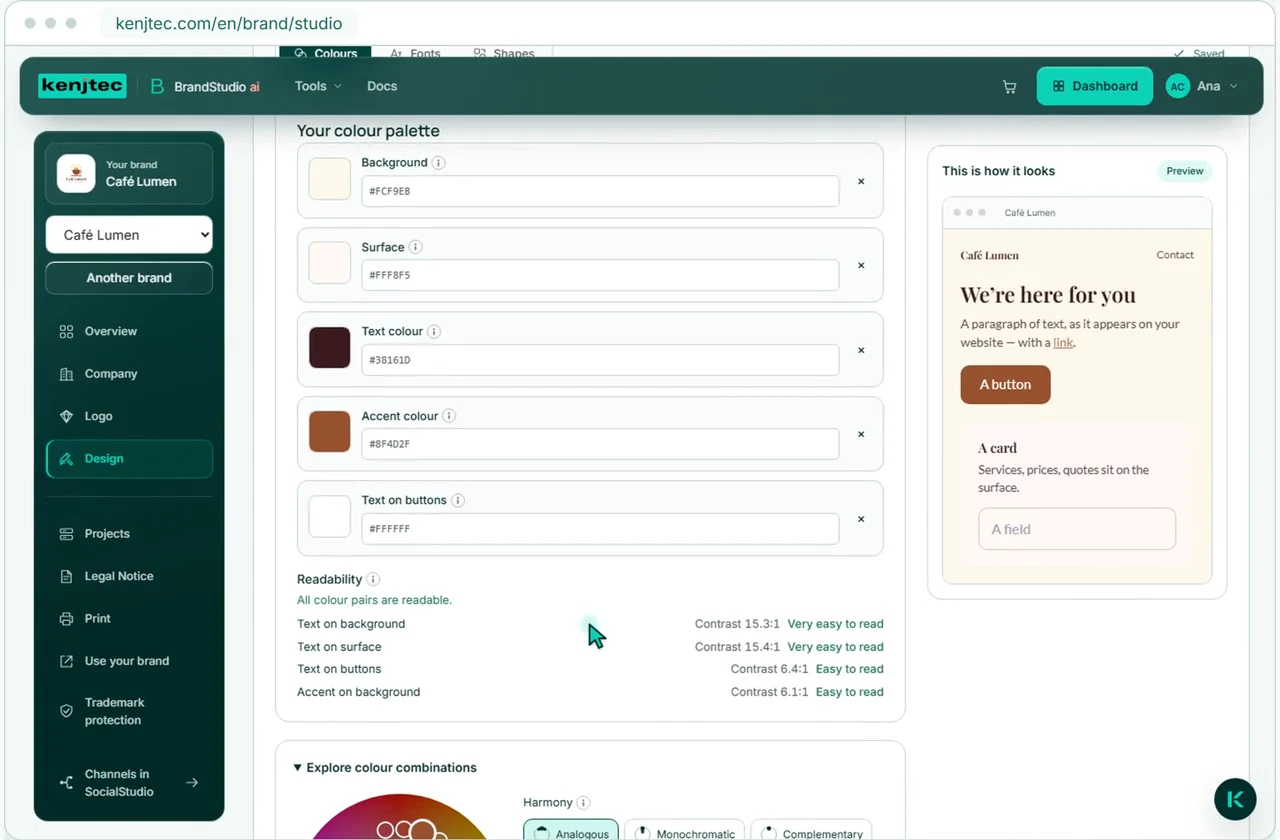
Set colours and fonts in one place
Read the film’s explanation
Manage your logo, colours, fonts and company details in BrandStudio. Forms, draft invoices, linked WordPress sites and printed materials use them.
- You type your address only once
- The legal notice is attached to every website of the brand
- Print materials as a PDF for your print shop
- Upload your logo or have the AI design one
No logo yet?
Design a logo with AI or upload your own.
Suggestions in your brand colours
Describe in one sentence what your logo should show — Kenji drafts up to four suggestions in your brand’s colours and font. Already have one? Upload it once, and every size is created from it, from the browser icon to the preview image when sharing.
Kenjikenjtec ai
From one sentence
A barber in St. Pauli, classic, with comb and scissors
You revise a draft with one more sentence. Drafting and revising count towards your AI bar — if no draft passes the check, nothing is deducted.
Already have a logo?
- Nine formats, from the browser icon to the preview image when sharing
- Without AI and without using AI credit
Colours & font
Set brand colours and fonts.
Colours that stay readable
Choose colours for five roles, body and heading fonts, and button and card shapes. Preview each choice as you make it. BrandStudio checks key colour combinations against WCAG and flags low contrast with a written warning and an icon.
- Upload your own font: .woff2 for the browser, .ttf for PDFs
- Forms, invoices and print materials follow the same choice
- A form, invoice or WordPress site may differ — you can go back to the brand at any time
Print materials from your brand.
The brand becomes paper
Your brand also appears on business cards, letterheads, flyers and folded brochures. Bring content from your website, shop or form straight into flyers and brochures. Check the preview and download your PDF in PrintStudio.
- Business card 85 × 55 mm with 3 mm bleed
- Letterhead in A4, flyer in A5 and a six-page folded leaflet
- Everything as a PDF for your print shop
- A brand sheet with colour values, fonts and shapes for your print shop or agency
Legal Notice
Your legal notice is built from your details.
In your website’s language, with nothing made up: the fixed labels exist in all twelve languages, and your address appears exactly as you write it.
- You enter a trade register number, tax number or business licence in extra lines with your own label
- Without AI and without using AI credit
What you haven’t entered doesn’t appear. It’s up to you to decide which details your country requires — at the end of the legal notice there’s a note that some countries require more.
Where your brand appears.
What you set in BrandStudio is used by these tools. Forms and sites with their own design keep that design.
- FormBuilder aiNew forms follow your brand – with logo, colours, font and contact details.
- WebSiteBuilder aiNew websites use your colours and font, and the legal notice is built from your company details.
- WordPressBuilder aiWordPress sites follow your brand once you connect them to it.
- ShopBuilder aiYour shop uses your brand’s colours and font, as long as you don’t give it its own design.
- PrintStudio aiBusiness cards, letterheads, flyers and folded brochures as PDFs for your print shop.
- InvoiceInvoices in BusinessCloud ai carry your brand’s colours, font and logo.
Branding for your use case.
- Starting a businessLogo, company details, website and business card from one account.
- FreelancersYour own website with enquiries by email, and a business card with a QR code.
- Club and communityMembers-only pages and sign-ups under one address.
- Invoicing for the self-employedQuotes and invoices in your customers’ currency and language.
Frequently asked questions.
Is the legal notice compliant?
We don’t promise that. The legal notice shows exactly the details you enter, and nothing is checked. It’s up to you to decide which details your country requires. BrandStudio doesn’t create a privacy policy or terms and conditions.
Does the AI design my whole brand?
No. You choose the colours and fonts yourself. On request, Kenji drafts up to four logo suggestions in your brand colours, and you can revise one of them with another sentence. KENJTEC doesn’t check whether a logo can be registered as a trademark.
What happens when I change my brand?
Everything that follows the brand is updated: forms and draft invoices read it every time they are opened, and WordPress sites receive the change. Issued invoices stay as they were, and forms or sites with their own design keep that design.
Can I upload my existing logo?
Yes. You upload it once, and nine formats are made from it without AI, from the browser icon to the preview image when sharing. The logo needs at least 400 pixels on its longer side.
Does BrandStudio check whether my colours are readable?
Yes, for the important colour pairs such as text on background or text on buttons. Contrast is measured to WCAG, with a minimum of 4.5 to 1. A pair that is too weak is flagged, not forbidden. BrandStudio doesn’t check whole pages.
Can I manage several companies separately?
Yes. For each company you create a separate brand with its own company details, and every form, website and print item belongs to exactly one brand. How many brands you can create depends on your plan. There is no separate login for your clients.
Does BrandStudio work without AI?
Yes. You manage colours, fonts, company details and the legal notice by hand, without using AI credit. The AI’s logo designs and uploading a logo or fonts come with the plans.
Your business. Your platform.
Your tools. One KENJTEC plan.
Website, brand, content and office belong to one platform. Choose the plan with room for your projects.
One account connects your tools. AI uses your shared AI credit.
Create your brand.
Enter it once, use it many times
If you look after several companies, you create a separate brand with its own company details for each. How many brands you can create depends on your plan.
Create brand