
Upload once
Drag or click. Several images at once, straight into your library.
KENJTEC MediaStudio ai is the shared library for images, logos, videos and PDFs, for self-employed people and small businesses worldwide. You upload images once and use them in your website, WordPress, shop, form and social post; along the way, MediaStudio removes location and camera data from your photos. On request, Kenji, KENJTEC’s AI, suggests image descriptions.
Idea and hands-on demonstration
Schematic view of worldwide delivery. The dots are not selectable storage locations.
Editing in the editor
Upload once. Use it in your website, WordPress, shop, form and social post. MediaStudio is the shared image library for your platform.
When you upload JPEG, PNG or WebP images, MediaStudio ai removes embedded location, camera and device data. The visible image content is preserved.
Your files
Upload the same image three times? No.
Anyone with a website, a form and a WordPress site otherwise has three image collections — and can't find the logo in any of them.
Once uploaded, your images are ready to pick in every tool: website, WordPress, shop, form and social post. PDFs and videos you share via their address.
Duplicate uploads do not count twice.
Crops
One photo, five crops
With one click you turn a photo into crops for a story, a portrait post, a square post, a website header image and a link preview. Each becomes its own file; the original stays unchanged.
Everything in one place
Drag or click. Several images at once, straight into your library.
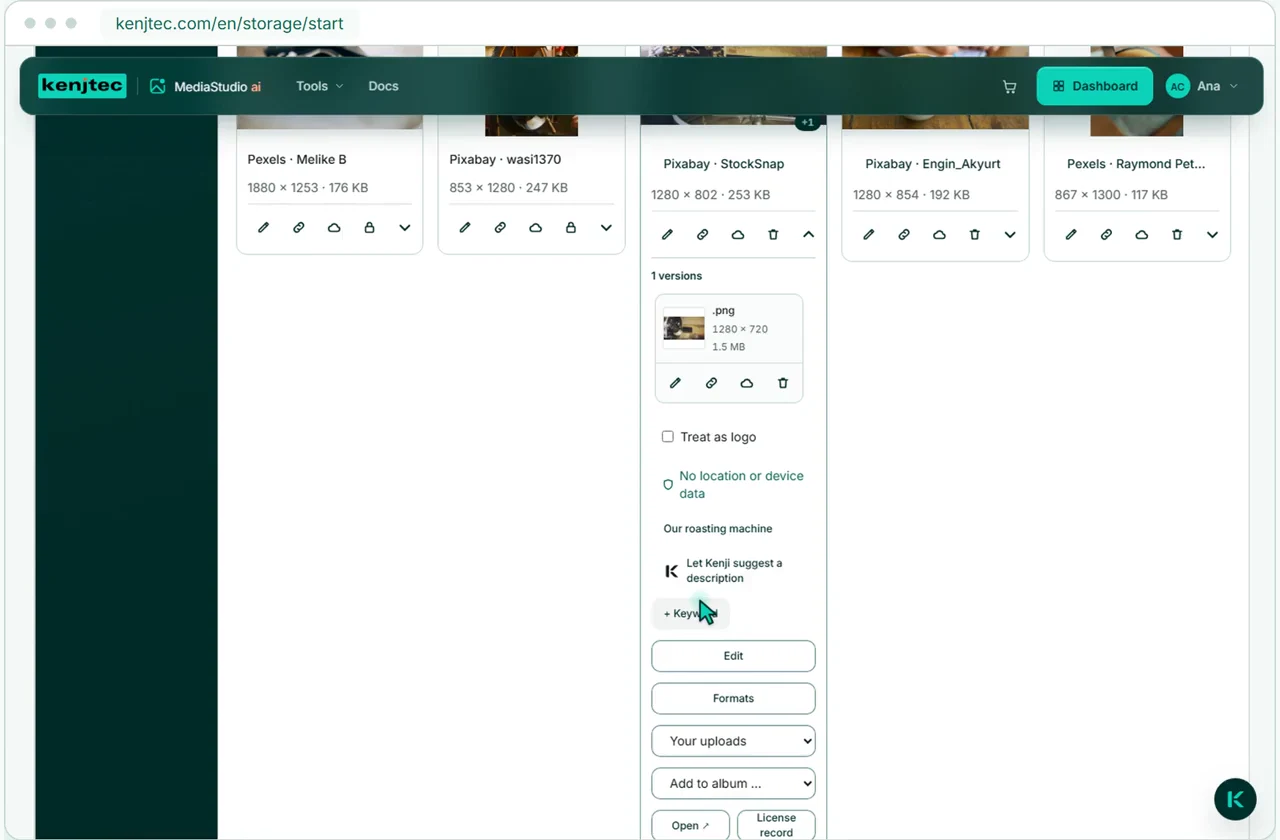
Describe what the image shows in one sentence, for people who use screen readers. Write the description yourself or request a suggestion, which uses AI credit. When you add the image to your website, its description goes with it.
Kenji, KENJTEC’s AI, can suggest a description. Review it, edit it and decide whether to keep it. Suggestions count against your AI bar.
Every file gets a fixed address at cdn.kenjtec.com that doesn’t expire — not even when you rename it or file it in a folder. The address is public: anyone who knows it can open the file.
Ready in every tool
The same collection appears in the image pickers of WebSiteBuilder ai, WordPressBuilder ai, ShopBuilder ai, FormBuilder ai and SocialStudio ai.
A CDN for your media
Your images. Available worldwide.
A CDN (Content Delivery Network) delivers your public media through a worldwide network and caches copies. Upload your files once in MediaStudio and share their stable address — KENJTEC takes care of the CDN connection for you.
Why
MediaStudio ai removes location, camera and device data from JPEG, PNG and WebP images without re-encoding them — they lose no sharpness. Only the colour profile and orientation stay, so colours are right and phone photos aren’t sideways.
You find suitable photos and graphics right in MediaStudio, from royalty-free image sources and cleared for commercial use. One click copies the image into your collection; source, creator and licence text stay on record.
Images in MediaStudio are publicly accessible. Move unused images to your private BusinessCloud. When bringing images back from the cloud, you first confirm that they will become public.
Logos, images, videos and documents are kept apart, and whatever a tool saves lands in that tool’s folder. Crops and edited versions sit in a stack under their original.
Images as JPEG, PNG, WebP and GIF up to 25 MB, PDF documents up to 25 MB and videos as MP4 or WebM up to 200 MB. PDFs show a preview of up to five pages, and videos play right in the library. Only images go into your tools — PDFs and videos you share via their address. We deliberately don’t accept SVG: an SVG file can contain program code, and it would sit publicly under our own address.
Yes. MediaStudio ai removes embedded location, camera and device data from JPEG, PNG and WebP images when you upload them — first in your browser, then again on the server before the file appears in your library. Use the cleanup option to remove this data from older files. Videos and PDFs are unchanged, and the visible image content stays the same.
Not by hand: one click turns a photo into five crops — story 9:16, portrait 4:5, square 1:1, header image 16:9 and the preview when sharing. Cropping centres on the focal point of the image; if you want to cut precisely, use the image editor.
It doesn’t take up space twice: MediaStudio ai recognises duplicates by their content, not their name, and gives you back the existing file. This applies to images and PDFs. A newly exported or edited version is a file of its own.
In your library in MediaStudio. Every file there has a fixed, public address at cdn.kenjtec.com and reaches your visitors through a service provider’s worldwide delivery network. Images that shouldn’t be public you move to your private BusinessCloud.
As long as a product in your shop, a social post, an entry in your WordPress media library or your brand points to the image, it can’t be deleted — MediaStudio ai shows you where it’s used. Websites and forms work with a copy, so no gap appears there. There’s no trash: once the image is free and deleted, it’s gone immediately.
Yes. One click removes the background behind a subject or enlarges an image; in the image editor you crop, rotate, adjust colour and brightness, add text and resize. Every result becomes a new file under the original — the original stays as it was.
By file name, image description and keywords, even with parts of words. MediaStudio ai recognises keywords for the image content when you upload — in English, and the most common ones in German too; you add your own in any language. On top of that you filter by type, source and orientation.
Uploading, organising and using images do not use AI credit. Neither do cropping, background removal or upscaling. Only image descriptions suggested by Kenji count against your AI bar. Your storage usage appears at the top of your library.
Your business. Your platform.
Website, brand, content and office belong to one platform. Choose the plan with room for your projects.
One account connects your tools. AI uses your shared AI credit.
MediaStudioai
All your images in one place
MediaStudio ai is included in every plan.
Google Analytics helps us improve the website. Google receives usage and device data; this may be processed in the USA.
Optional. Your choice lasts 180 days and can be changed at any time in the cookie settings.
Privacy policy