
Your own domain
KENJTEC DomainStudio ai is the place for your name on the web, for self-employed people and small businesses worldwide. You buy a domain or bring one you already have and decide what appears at which address: website, form or shop, with the certificate set up automatically. On request, Kenji, KENJTEC’s AI, plans the settings from one sentence.
Idea and hands-on demonstration
Your name online: website, shop and forms under one address.
- Find, buy and configure your domain here
- The certificate is set up automatically
- All your addresses at a glance
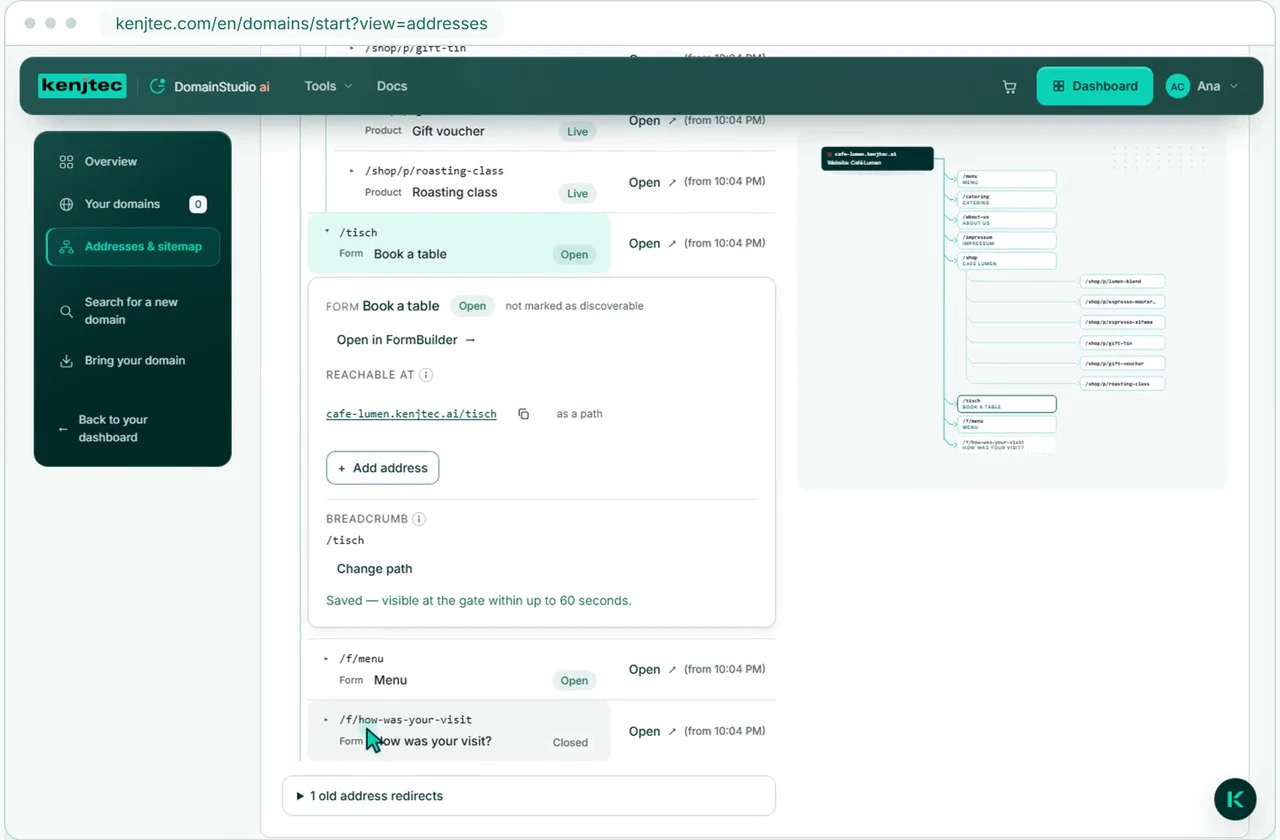
All your addresses at a glance
Read the film’s explanation
One domain for your website, form and shop. You decide what appears at each address. The address map shows the assignments; KENJTEC sets up the certificate for the encrypted connection.
You need an account to manage your domain. We create it as you order — in one step.
Already have a domain?
Bring your existing domain and manage it.
Your domain can do more than sound good
Bring your own domain and manage DNS, subdomains, your website and redirects in DomainStudio ai. Registration and payment stay with your current provider.
Manage your domains- With your current provider
- Registration and payment
- At KENJTEC
- DNS and connections
- Choose where your domain points and which services it uses.
What you can control yourself
DNS, subdomains, redirects and address plan.
One place for all your domain’s connections
Your website at your main address
Point your domain, including www, to a website, a form or a shop in your account. The certificate for a secure connection is set up automatically.
All your addresses at a glance
The address plan shows each of your addresses with the website, forms and shops underneath — as a list and as a diagram. One click on a row opens its settings.
Short addresses for forms and shops
Give them memorable names such as your-company.com/signup or /store. The name works the same on every one of your addresses.
Create subdomains
Give your projects their own subdomains. Connect them to a KENJTEC project, another address or your own IP address.
Connect your email service
Connect your domain to the email service you already use, without typing in a single record. The studio does not create a mailbox.
Edit DNS records yourself
View your DNS records, edit them and add your own. You decide which name points to which destination.
Tell the AI
Say in one sentence where something should go, for example “your-company.com should show the shop”. The AI plans the steps, only your click carries them out — and every step also works by hand.
For WordPress, too
Put a domain managed here, including www, in front of your WordPress site. KENJTEC takes care of the records and the certificate.
Set up redirect
Send visitors to another web address. A domain can serve a website or redirect visitors, but not both at the same time.
How to connect your domain
Connect a domain via its nameservers.
Add. Check. Connect
You need a domain you own and access to its settings at your current provider.
- 1
Add a domain
Enter your existing domain. DomainStudio shows you the two nameservers needed to connect it.
- 2
Check records
Before switching, check the records for your website, subdomains and email. Anything you want to keep working must also have its records set up at KENJTEC.
- 3
Enter nameservers
Enter the two nameservers shown in your current provider’s settings. Nothing changes until the switch takes effect.
Clarity, not fine print
Registration, prices and refunds.
You know where you stand
A domain bought here is registered in your name. One you bring stays registered with your current provider — only its DNS management is at KENJTEC.
Prices from the registry
Every price is requested from the registry at the moment you search, not estimated. If the registry gives none, it says “Price on request”, and that extension can’t be bought.
If the registry says no, your money comes back
At checkout you state once who owns the domain. If the registry says no, KENJTEC refunds the full amount to the same card without you having to ask.
Email stays with your email service
The email feature sets up DNS records for your existing email service. This does not include a mailbox or email sending; BusinessMail ai is not available to order.
Website, forms, shop and email under your domain.
- WebSiteBuilder aiYou put your website on your domain; the certificate is set up automatically.
- FormBuilder aiForms get short addresses under your domain, such as your-company.com/signup.
- ShopBuilder aiYou put your shop under your domain, such as your-company.com/shop or shop.your-company.com.
- WordPressBuilder aiPut a domain managed here, including www, in front of your WordPress site. KENJTEC takes care of the records and the certificate.
- BusinessMail aiConnect your domain to the email service you already use, without typing in a single record. The studio does not create a mailbox.
Domains for your use case.
- Course, workshop and eventSign-ups with limited places, shared by link or QR code.
- FreelancersYour own website with enquiries by email, and a business card with a QR code.
- Starting a businessLogo, company details, website and business card from one account.
Frequently asked questions.
Do I need to transfer my domain to KENJTEC?
No. A domain you bought elsewhere stays registered there and is paid for there. You bring it into management here — or you connect just one address, such as shop.your-company.com, with one record at your provider. There is no transfer of the domain to KENJTEC.
Is a domain included in the plan?
No. You buy domains separately, one year at a time; the plans don’t include any. Without a domain of its own, every account has its address under kenjtec.ai.
Do I even need my own domain?
Not to get started. Every account has its own address under kenjtec.ai where your website, forms and shops can be reached. If you put a domain in front of it later, the same structure applies there, such as your-company.com/shop.
What should I check before changing nameservers?
Before switching, check the records for your website, subdomains and email. Anything you want to keep working must also have its records set up at KENJTEC.
When do the new settings take effect?
The records at KENJTEC only take effect after the nameservers have switched. How long that takes depends on your current provider. DomainStudio shows you the connection status.
Can I register a domain I find straight away?
Yes. Through checkout it is genuinely registered, for one year. If the registry gives no price for an extension or requires additional details, checkout declines before payment.
Do I also get a mailbox here?
No. The studio connects your domain to the email service you already use: for Google Workspace, Microsoft 365, iCloud Mail and Zoho Mail (EU data centre) it sets the records itself; other services you enter in the DNS tab. KENJTEC’s own mailboxes can’t be ordered at the moment.
Can I see what search engines find under my domain?
Yes. For every address, the address plan shows the pages its sitemap.xml lists and, for a missing one, the reason — with a link to the place where you change it. It does not show how search engines rank the pages.
What happens if something goes wrong during setup?
Then nothing is left half-changed: if a step fails, the studio undoes what that attempt created. And you read a sentence instead of an error number.
Your business. Your platform.
Your tools. One KENJTEC plan.
You buy your domain separately. Compare the tools, projects and storage available on your AI platform on the pricing page.
One account connects your tools. AI uses your shared AI credit.
DomainStudio ai
Manage your domain at KENJTEC.
Get more from the domain you already own
Connect your domain and configure your website, subdomains and DNS records in one place.