
Range with variants and stock
Create products with variants and inventory. Choose images directly from MediaStudio ai without uploading them again for the shop.
KENJTEC ShopBuilder ai is the guided online shop in your KENJTEC account, for makers, retailers and clubs worldwide. From one sentence or from photos of your goods, Kenji, KENJTEC’s AI, suggests your product range with variants; you enter prices yourself. You show your shop at your own address, with your branding and in your website.
Kenji drafts your product range from a description or product photos. Your brand comes from BrandStudio, your images from MediaStudio. You manage products and prices and add your product range directly to your website.
Idea and hands-on demonstration
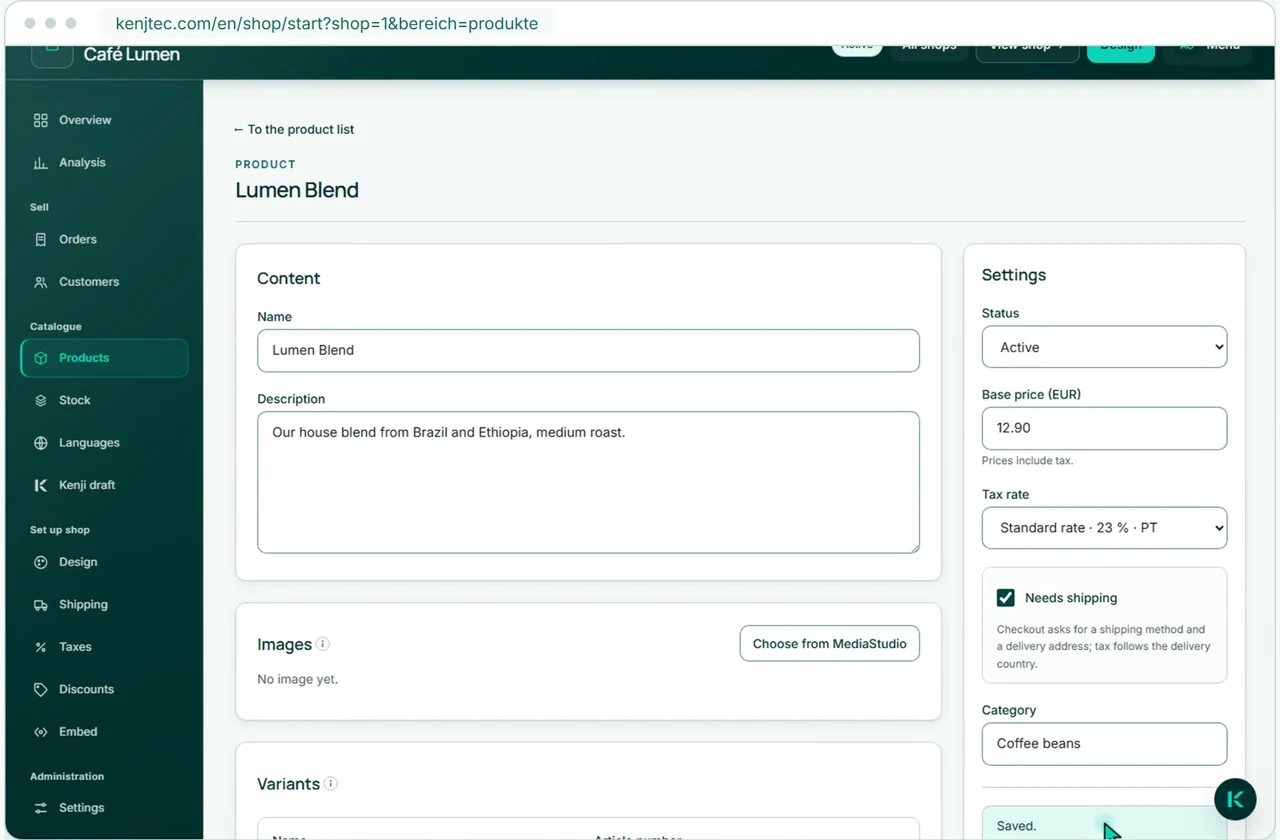
Open “Products” and click “New product”.
How it works
Describe. Review. Open
Describe your product range, review the draft and open your shop.
A sentence about your business or photos of your goods are enough: Kenji suggests categories and products with variants. Kenji sets no prices — you enter those yourself.
Only when you accept it does the suggestion become products — and they start out as drafts. You can also create products yourself, entirely without AI.
Once your brand has a name, postal address and contact details, you open your shop under your address, such as yourname.kenjtec.ai/shop. In your website, you add the product range as a section.
What you get
Your product range becomes a clear, tidy shop
Manage products, variants, stock, languages and design in one workspace. Manual changes do not use AI credit.
Create products with variants and inventory. Choose images directly from MediaStudio ai without uploading them again for the shop.
Say what should change in your shop — for example “all candles twenty percent cheaper”. You see every step in plain language, and nothing runs until you approve it.
Your shop follows the colours, font and shapes of your brand from BrandStudio ai — you only change them there. You check your own colours on a real product; combinations that are hard to read can’t be saved.
The AI translates your product texts; a language only becomes visible once you approve it. Your shop only offers languages that have approved texts.
In PrintStudio, import products with their current prices into a flyer or folded leaflet. The QR code leads to your open shop. When prices change, import the products again and download a new PDF.
Every active product has its own page with an image gallery and a preview image for shared links — ready to share in chats and readable for search engines.
Not at the moment. Your shop shows your product range, prices, variants and stock; paying and ordering are not possible there today, and the shop does not issue invoices.
From one sentence about your business, Kenji suggests categories and products with variants; in up to six photos from MediaStudio ai it recognises individual products. It sets no prices — its suggestion has no price field at all. This uses AI credit; what you do by hand does not.
No. Kenji prepares drafts. You review them and approve changes yourself.
Yes. You maintain sizes, colours and other variants per product. You move stock — incoming goods, corrections — and every movement stays traceable per variant. When it runs out, the shop shows the variant as unavailable.
Yes. You choose shop images from your shared media library.
Under yourname.kenjtec.ai/shop — you name the path yourself in DomainStudio ai, such as /store or /loja. You can open the shop as soon as your brand has a name, postal address and contact details. In your website, you add the product range as a section.
Yes. In DomainStudio ai you point your own domain or a subdomain of it (shop.your-company.com) at the shop — your kenjtec.ai address stays in place alongside.
Yes. Three text fields in your shop become pages of their own, linked in the footer; an empty field gets neither a page nor a link. Company name, address and legal notice can come from your brand’s company details; you write the privacy policy and terms yourself — KENJTEC neither supplies nor checks legal texts.
Yes. One click downloads your product range as a workbook (.xlsx) — amounts are written the way their currency requires, and accents and other characters stay intact.
Yes. In PrintStudio ai, one click brings your shop’s name and address and the current product prices into a flyer or folded brochure. After that, every text stays freely editable.
Yes, quietly: the footer of every shop carries the line “Built with KENJTEC”.
When you need the extensibility of the WordPress ecosystem for a sophisticated or highly customised shop project.
Your business. Your platform.
Website, brand, content and office belong to one platform. Choose the plan with room for your projects.
One account connects your tools. AI uses your shared AI credit.
Create your product range yourself or with AI help, and show it under your address, in your brand and in your website.
Google Analytics helps us improve the website. Google receives usage and device data; this may be processed in the USA.
Optional. Your choice lasts 180 days and can be changed at any time in the cookie settings.
Privacy policy