

01
Say what you do
Describe your business, what you offer and the style of your website. Kenji creates the draft.
KENJTEC WebSiteBuilder ai is an AI website builder for self-employed people, clubs and small businesses worldwide. You describe your business in one sentence, and Kenji, KENJTEC’s AI, drafts a whole website from it with text, colours, font and images. You change it right on the page or in conversation and publish it yourself at your kenjtec.ai address.
Idea and hands-on demonstration
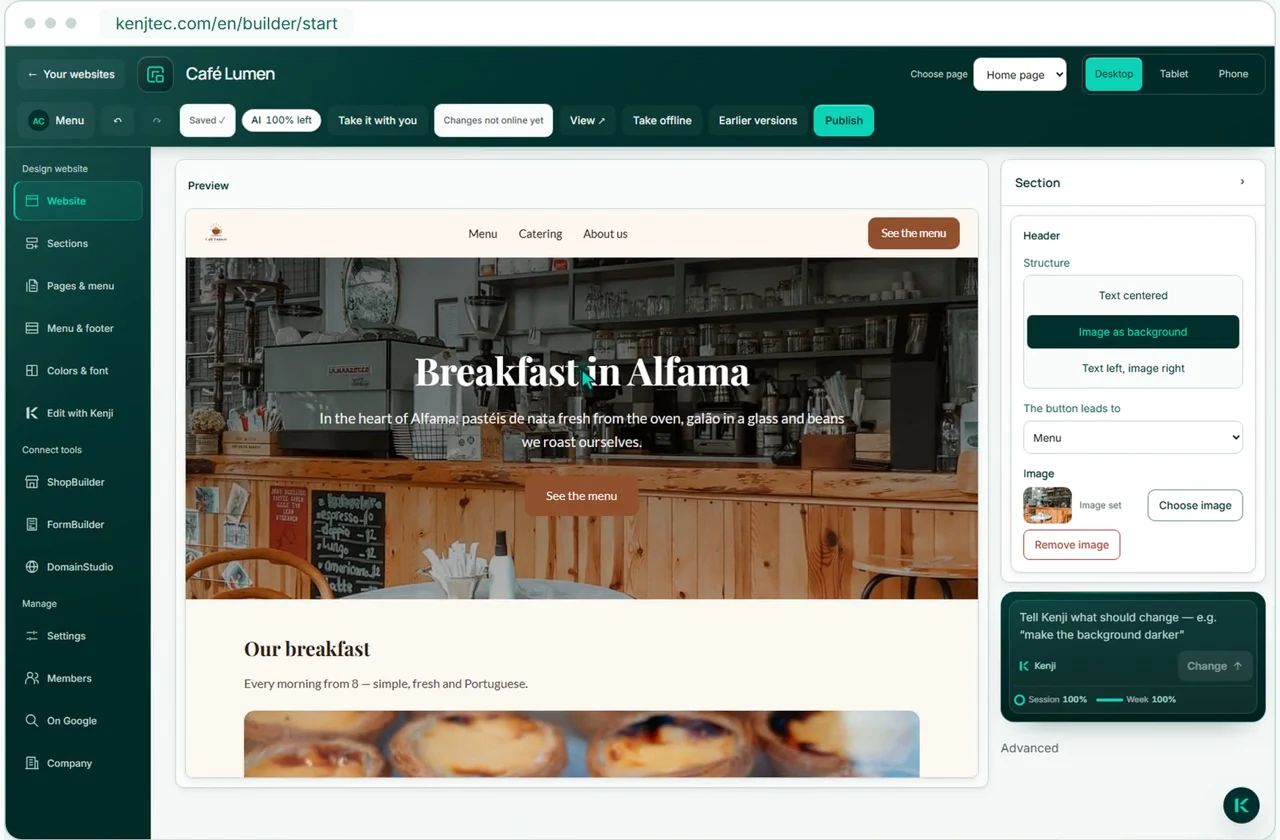
Typing directly on the page
Kenji designs your website from your description. Get images from MediaStudio and add forms and your product range as sections. Edit the page directly or by talking to Kenji, then publish it yourself.
A card is required for your account. AI and publishing require a plan.
How it works
Describe. Edit. Publish
Describe your business, what you offer and the style of your website. Kenji creates the draft.
Kenji creates the structure, text and design from your description. Then you edit the website in the editor.
Make changes in the conversation or right on the page. Your click puts the website online at your kenjtec.ai address — for that you need a name or company, an address and an email or phone number.
Visual editor
Your website. Ready to edit
Type straight into headings and text, rearrange sections and use the device view to check how your page looks on tablet and phone.
Click a heading or text block to edit it directly.
Add, move, duplicate or delete a section.
See your page at tablet and phone width.
Undo or redo changes in the editor.
What kind of section?
Ten types. A website that fits your business
Eight types for your content, plus forms and your product range from your other KENJTEC tools — no code needed. Add, move, duplicate or delete, with undo and redo.
A heading and free text — the bread and butter of every page.
Your services as clear bullet points.
Address, phone and email from the console — plus a form whose enquiries reach you by email.
A colored band with a button to the contact section.
Common questions that fold open.
What your customers say about you.
Your offers as honest info cards — no checkout.
A large image, with an optional caption.
Edit
Two ways. One result
WebSiteBuilder ai lets you do both: tell Kenji what to change or edit the page yourself. Manual edits do not use AI credit.
Tell Kenji in one sentence what should change — no menu, no manual. Kenji only changes the page that’s currently open.
“Make the headline shorter.”
New websites use the colours and font from BrandStudio. Your social channels from SocialStudio appear in the footer. Your own design or channel settings take priority.
Developer mode
Start simply. Go further in code
Extend your website in developer mode with your own HTML, CSS and JavaScript. Preview and publish your custom code separately from the rest of your site.
Add HTML, CSS and JavaScript where your project needs more freedom.
Check your code additions in the protected preview before you publish them. They go online independently of the rest of your page.
Each code publication is kept as a version. You can return to an earlier version of your code.
Kenji suggests code changes. Add them to your code draft and publish them when you are ready.
Your website
Your site belongs to you
Until your first click on Publish, your website is a draft that visitors can’t see. After that, new content goes online with your next click. You can take your website with you as an archive at any time — even as a draft.
Your website goes online at your own kenjtec.ai address when you click Publish — no domain purchase needed. For that, you enter a name or company, an address and an email or phone number in BrandStudio.
Search for one and buy it right in the editor, or connect one you already have. Your kenjtec.ai address stays alongside it.
A secure connection comes standard with published websites.
Your site belongs to you. You can export it at any time.
You add what you create in your other KENJTEC tools to your website.
A KENJTEC account: an email address and password, confirmed with a code, plus a credit or debit card. Nothing is charged when you create it — the card is only checked. Drafts with Kenji and publishing are part of the plans; what a plan costs is shown on the pricing page.
Yes. Edit the page directly or tell Kenji what to change. Manual edits do not use AI credit. Enter your name, address, phone number and opening hours in dedicated fields — Kenji does not rewrite them.
No. A new website is a draft until you publish it, and new content only goes online with your next click. Some things take effect without a new release, though — for example changes to your brand, the search engine switch and the access rules of your members’ area. You can take the website offline at any time; nothing is deleted.
Yes. A new menu item is also a new page, with a readable address and its own content. For each page you decide whether it appears in the menu, can only be reached via its address, stays hidden or is for members only.
No. The website has no blog, appointment booking, newsletter, visitor statistics or checkout. You receive enquiries through the contact section or a form from FormBuilder, and you show your product range as a section from ShopBuilder.
The AI picks suitable photos from royalty-free image sources, you can find more in the editor, or you use your own from MediaStudio ai. KENJTEC stores every photo itself instead of embedding it from third-party servers; the licences of the image sources apply.
In the language you describe it in — one of twelve, with Arabic running right to left. Each website has exactly one language; if you need two, you create two websites.
Yes. You set a page to “Members only” and keep a guest list; members sign in without a password, using a link from their email. The area isn’t meant for confidential material: images and files on these pages can be reached via their address.
Nobody can promise a ranking, not even us. You set the title and description for search engines yourself, with a preview, suggestions from Kenji and a checklist. How search engines rank your site is up to them.
Yes. You search for it and buy it right in the editor, or connect a domain registered elsewhere. The domain is bought separately; the certificate for the encrypted connection is set up automatically, and your kenjtec.ai address stays alongside it.
Yes. You can download it as an archive at any time, even as an unpublished draft: the finished site that runs in the browser without a server, your images, the raw data and a guide. Anything that needs KENJTEC — contact form, members’ pages, embedded forms and shop — doesn’t work in the archive.
WebSiteBuilder ai is a ready-made website with no technical layer underneath, which you edit right on the page. If you need plugins, a blog or a WooCommerce shop, WordPressBuilder ai is the right route: full WordPress, maintained through a cockpit.
Your business. Your platform.
Website, brand, content and office belong to one platform. Choose the plan with room for your projects.
One account connects your tools. AI uses your shared AI credit.
Say it. See it. Online
One sentence is enough to see what comes of it.
A card is required for your account. AI and publishing require a plan.
Google Analytics helps us improve the website. Google receives usage and device data; this may be processed in the USA.
Optional. Your choice lasts 180 days and can be changed at any time in the cookie settings.
Privacy policy