
Invoices for the self-employed — in your customers’ currency
Quotes and invoices in your customers’ currency and language.
Invoice is the invoicing app in your BusinessCloud. Your customers come from the address book, and due dates go into the calendar.
Idea and hands-on demonstration
Invoices in your customers’ language and currency — across borders too.
- In your customer’s currency and language
- Set your own tax note
- Send invoices and friendly reminders
Design and preview
Read the film’s explanation
Invoicing for the self-employed
What you get.
In your customers’ currency
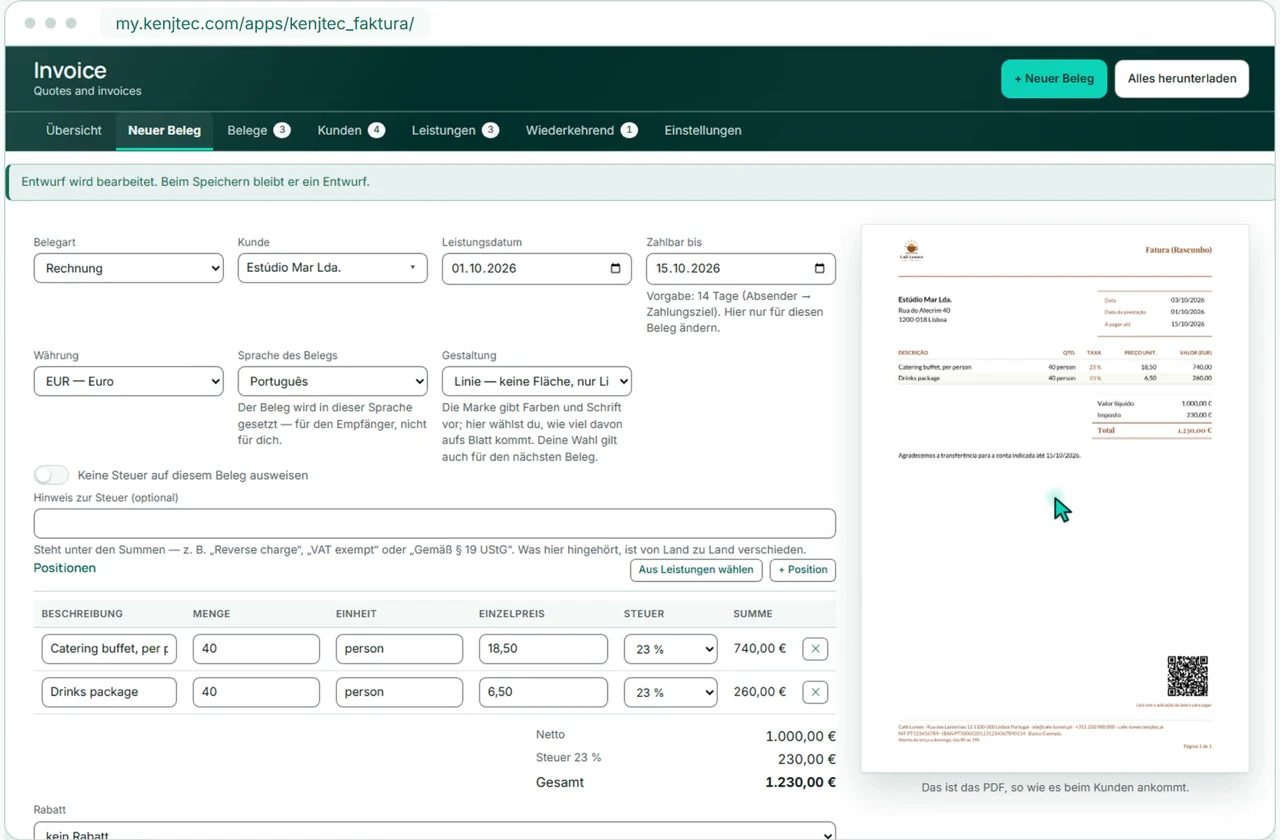
55 currencies in their real notation, the document in one of twelve languages — the taka grouped in lakhs, the yen without decimals.
The PDF as you write
Next to what you type sits the real PDF, exactly as your customer will receive it.
Send and follow up
An accepted quote becomes the invoice with one click. You send it directly, record payments and send a friendly reminder about anything still open.
Your tax note
The invoice carries the note your country requires — Invoice doesn’t insert anyone else’s legal wording.
The tools behind it.
They all live in one account: you sign in once and switch between them.
Account and plan
How to get started .
Create account
With your email address and a password.
Choose a plan
With a plan you publish, upload images and work with the AI.
Your business. Your platform.
Your tools. One KENJTEC plan.
Website, brand, content and office belong to one platform. Choose the plan with room for your projects.
One account connects your tools. AI uses your shared AI credit.
Related guides and next steps
Writing a quote or an invoice
How to write a quote or an invoice in Invoice: customer, items, discount, currency, language and tax, with the PDF itself as the preview alongside.
Issuing and cancelling invoices
What happens when you issue a document in Invoice, how the numbering counts, and how to reopen, cancel or delete an invoice.
PDF, sending and e-invoice
Open documents from Invoice as PDFs, send them by email, check the outbox and download the e-invoice (EN 16931) — with a QR code on euro invoices.
More use cases.
- Café and restaurantA website from one sentence, and the menu by QR code at the table.
- Course, workshop and eventSign-ups with limited places, shared by link or QR code.
- Club and communityMembers-only pages and sign-ups under one address.
- FreelancersYour own website with enquiries by email, and a business card with a QR code.
- E-invoices with ZUGFeRDInvoices as ZUGFeRD and Factur-X: one PDF that people read and software imports.
- Trades and repairsA website, enquiries with a guide price, and sign-off with a signature.
- PortfolioYour images in one place, without revealing photo data.
- Starting a businessLogo, company details, website and business card from one account.