
What the API does
The KENJTEC API gives your own programs access to your account: read forms and their responses, shops and orders — and write: build and publish websites, manage DNS records, write invoices, upload media. On top of that there are webhooks — we call your server as soon as something happens. And your own AI can work through MCP with the same key.
The address is https://api.kenjtec.com/v1. The API is included in every paid plan, at no extra cost.
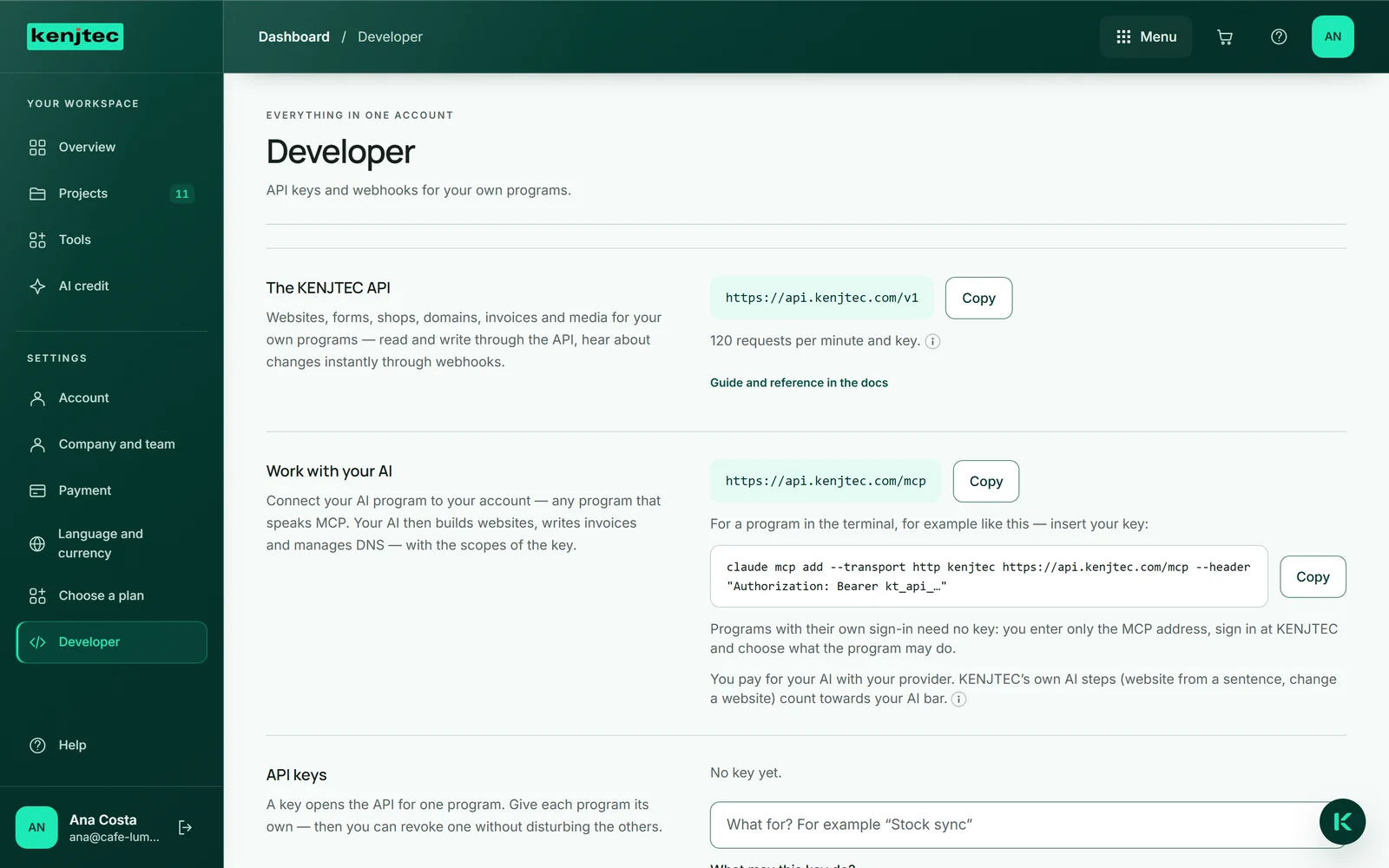
Create a key
Every program signs in with its own API key. A key carries scopes: forms:read reads forms and responses, orders:read reads shops and orders, webhooks:manage creates and deletes webhooks. The writing endpoints have their own scopes per area. Give each program its own key — then you can revoke one without disturbing the others.
- Open the dashboard and choose Developer under “Settings”.
- Under “API keys”, give the key a name, for example “Stock sync”.
- Under “What may this key do?”, choose only the scopes the program needs.
- Click “Create key” and copy the key straight away.
The key is shown exactly once. We only store a checksum — if you lose it, “Revoke” it and create a new one.
Your first call
Send the key with every request in the Authorization header. /v1/me tells you which account the key belongs to and which scopes it carries.
curl https://api.kenjtec.com/v1/me \
-H "Authorization: Bearer kt_api_…"{
"id": 1042,
"object": "account",
"email": "ana@your-company.com",
"handle": "cafe-lumen",
"address": "https://cafe-lumen.kenjtec.ai",
"key": { "name": "Stock sync", "scopes": ["orders:read"] }
}The endpoints
These endpoints exist. The complete, machine-readable description is at https://api.kenjtec.com/openapi.json — you can generate client libraries for any programming language from it.
GET    /v1/me
GET    /v1/forms
GET    /v1/forms/{id}
GET    /v1/forms/{id}/responses
GET    /v1/forms/{id}/responses/{id}
GET    /v1/shops
GET    /v1/orders          ?shop_id=  &status=  &payment_status=
GET    /v1/orders/{id}
GET    /v1/webhooks
POST   /v1/webhooks
DELETE /v1/webhooks/{id}

GET    /v1/sites
GET    /v1/sites/{id}
POST   /v1/sites
POST   /v1/sites/{id}/edit
POST   /v1/sites/{id}/publish
POST   /v1/sites/{id}/unpublish
GET    /v1/domains
GET    /v1/domains/{id}/dns_records
POST   /v1/domains/{id}/dns_records
PATCH  /v1/domains/{id}/dns_records/{id}
DELETE /v1/domains/{id}/dns_records/{id}
GET    /v1/customers
POST   /v1/customers
GET    /v1/invoices        ?kind=invoice|quote
GET    /v1/invoices/{id}
POST   /v1/invoices
POST   /v1/invoices/{id}/issue
POST   /v1/invoices/{id}/cancel
GET    /v1/media
POST   /v1/media/uploads
POST   /v1/media/{id}/confirm
GET    /v1/brands
GET    /v1/brands/{id}
Files in form responses appear with their name, not with an address. You can download them in FormBuilder.
Lists, amounts, times
Lists come newest first, at most 100 items per call (limit, default 25). For the next page, send the id of the last item as starting_after; has_more tells you whether more is coming.
Amounts are whole numbers in the smallest unit of the currency — cents for the euro, whole yen for the yen. Times are in UTC, ISO 8601.
curl "https://api.kenjtec.com/v1/orders?payment_status=paid&limit=50" \
  -H "Authorization: Bearer kt_api_…"
Errors and limits
Every error has the same shape: an error object with type and message. 401 means the key is missing, wrong or revoked. 403 means the key lacks a scope — or the account no longer has a paid plan (type plan_required). 404 means it does not exist, or it does not belong to your account.
Each key may make 120 requests per minute. Beyond that the API answers with 429 and gives the seconds until the next attempt in Retry-After.
{
  "error": {
    "type": "permission_error",
    "message": "This API key lacks the scope 'orders:read'."
  }
}
The API only accepts keys, never your sign-in in the browser. A key belongs on your server — never in a website or an app that others download.